Showing posts with label DITA. Show all posts

Sunday, 8 January 2012

Web 2.0 as a collaborative tool

Introduction

This blog will outline the background of Web 2.0, discuss its use as a publishing tool using the Internet as a platform and explore its potential in relation to developing technologies. While Web 2.0 is closely related to the semantic web and the growing openness of the Internet (sometimes referred to as ‘Web 3.0’), this is outside the scope of this blog and will not be covered.

The term ‘Web 2.0’ was first used by O’Reilly Media, Inc. in 2004. There has been confusion regarding a definition, as the use of ‘2.0’ sounds like a software upgrade. In fact, Web 2.0 was a term originally used to distinguish Internet companies that had survived the dotcom bubble bursting in 2001. O’Reilly (2005) used 6 headings to define Web 2.0:
1. The Web as Platform
2. Harnessing Collective Intelligence
3. Data is the Next Intel Inside
4. End of the Software Release Cycle
5. Lightweight Programming Models
6. Software above the Level of a Single Device

Since then, O’Reilly has emphasised that ‘the network is the platform’, and that ‘the cardinal rule is... users add value’ (KamlaBhatt, 2007). In others words, collaboration is central to the concept of Web 2.0. It is important to distinguish between Web 2.0 and social networking websites; Web 2.0 is both the platform on which technologies and sites have been built, as well as a space for user-generated content (UGC), rather than the social networking sites like Facebook and Twitter, which are built upon the platform (Cormode & Krishnamurthy, 2008).

This blog will explore three themes, with an emphasis on social networking websites. First, it will discuss the Internet as a platform, including publishing information. Second, it will consider digital data representation, and current use and future potential for information scientists in central government. Finally, it will investigate the latest Web 2.0 technologies and concepts, reflecting on their impact in the digital environment.


Publishing Information

As indicated above, the Internet (or network, or Web) is the platform. This means there is no longer a requirement to have specific software or a particular machine to access the same content. This is why, for example, both Mac and Windows users can utilise Facebook, Twitter, Flickr, and other Web 2.0 sites. This has opened up accessibility to a much wider user-base, as it is no longer necessary to program in HTML to publish to the Web because these sites provide an interface. The OECD suggests that this has democratised publishing on the Internet with a rise of ‘amateurs’ (Vickery & Wunsch-Vincent, 2007). In addition, Xu et al (2010, p.9) indicate that ‘the Web is becoming a useful platform and an influential source of data for individuals to share their information and express their opinions’. This sharing of opinions has changed the dynamic of publishing information, from the one-to-many ‘push’ of Web 1.0 to a many-to-many collaborative environment in Web 2.0.

The user-base of Web 2.0 sites is wider still due to technological advances in recent years. People can now use mobile phones, as well as tablets and laptops to access the Internet. As O’Reilly (2005) states in his definition of Web 2.0, this represents software above the level of a single device. It is possible to access information anywhere with an Internet connection. Additionally, it is easier to publish information on the go, as well as consume it. Most Internet-capable phones and tablets have cameras and facilitate the capture and sharing of information by users with Web 2.0 publishing tools. A common example of this is people sharing holiday photos instantly on Facebook and Twitter.

Blogging websites are publishing tools, and have become increasingly popular. Blogs, such as Blogger, enable users to post online using a familiar interface. While there is the option to write in HTML, many people simply use the text box and formatting buttons (see Fig 1). Several central government departments use blogs on their intranet sites. The Department for Business, Innovation and Skills uses the blogging tool in SharePoint, with senior staff and teams providing updates on their work via a blog. This is an effective way of publishing information, as all staff members have access and can use tools on the intranet to comment and provide feedback. An additional benefit is that no further training is required to use the software, as the interface is familiar to staff. As it is hosted on the intranet, it is accessible to all users as it is possible to apply personalised settings to profiles on their PCs, and to Internet Explorer, which is the browser used to access the SharePoint intranet site.

Screen shot of the Blogger Interface

Fig 1 – the blogging interface on Blogger

A further advantage to blogging is the wide availability of tools, and the ability to create professional-looking web pages with ease (Evans, 2009). Blogs are used by businesses and professionals, looking to publish information. These bloggers also use other Web 2.0 sites, such as Twitter, to capture a wider audience for their blog and to promote their business. A recent survey demonstrated that ‘almost all Professional Full Timers (93%) and Professional Part Timers (91%) us[e] Twitter’ (StateOfThe Blogosphere, 2011). Using multiple Web 2.0 sites allows professionals to push their information efficiently and easily.


Representation of Digital Data

Formerly, users who wished to publish content on the Internet needed an understanding of programming, such as using HTML to publish a web page. With Web 2.0 technologies, this is no longer a requirement as websites provide an interface. An example of this is the use of Yammer, a social networking tool, by a central government department to encourage its staff to work collaboratively. Maness (2006) argues that Web 2.0 ‘is not a web of textual publication, but a web of multi-sensory communication.’ This is the way in which Yammer is used by civil servants; they can publish their ideas, and can also give and receive feedback interactively. It also enables them to promote other people’s ideas by sharing links to other pages, such as news articles and publications. The web is no longer being used purely as a ‘push’ medium, but has been ‘transformed into a dynamic network harnessing creativity and collective intelligence’ (Fraser & Dutta, 2008, p. 2).

This provides a good opportunity for information scientists in government. The use of blogs and wikis allows them to organise their information in an accessible way, giving users the option to add their own folksonomies to optimise information retrieval. O’Reilly (2011) describes this exploitation of web applications as harnessing ‘collective intelligence’, which was one of his definitions of Web 2.0 in 2005. Information scientists could potentially use applications to try to capture information and understand ways of working within their organisations. Using Web 2.0 technologies offers information professionals a great advantage, as they can build applications to cater to their users’ needs. The advantage of this is that, unlike some information systems used, applications tend to be intuitive thus reducing the requirement for training for users. The use of applications also allows information professionals to address ‘one size fits all’ software, such as forcing an Electronic Documents Records Management (EDRM) system on users. It is possible to hide the EDRM system behind a Web 2.0 interface, which can be more easily adjusted to users’ needs. For example, some government departments are looking at implementing a more user friendly SharePoint interface to document management systems, while maintaining the underlying EDRM system to allow information specialists to apply information management policies, such as access controls and retention and disposal rules, behind the scenes.

Central government departments are not the only public service using Web 2.0 technologies to share information. Mitchell (2011) describes how the Deputy Chief Constable from Tayside Police encourages his staff to ‘tweet on the beat’. This creates both a challenge and opportunity for information scientists; the challenge will be to stay on top of the amount of information being published by users, and to try to keep information organised and presented in a meaningful way. These websites do offer some methods of organising information, such as Twitter lists which allows you to create a stream from the users in that group. The advantage of this is an accessible representation of digital information, which offers real-time information for Twitter users, externally and within the organisation. The disadvantage of relying on Twitter would be a loss of control, as information specialists would not easily be able to apply retention schedules, or ensure digital continuity without capturing Tweets and storing them on an internal system. This raises some integrity issues; for instance, context may be lost if police staff include links to external sites which are not captured. Furthermore, the use of Twitter raises the question of ownership and security; the Twitter terms and conditions make it clear that while information posted is your responsibility, they are granted a royalty- free licence to ‘use, copy, reproduce, process, adapt, modify, publish, transmit, display and distribute’ it (Twitter, Terms of Service). In this environment it is important that information specialists provide clear guidelines for staff using Web 2.0 services, to address these risks, although this is no guarantee that they will be adhered to.


Recent Advances

Technological developments have allowed these Web 2.0 applications to flourish. When Tim Berners-Lee first imagined the World Wide Web, he claims that he envisaged the interactive environment that is now associated with the term Web 2.0 (Laningham, 2006). The evolution of information and communications technology (ICT) has made it possible for people to use wikis, blogs, social networking, and the other applications described as Web 2.0. A noteworthy difference is that the use of these technologies has changed the way that people work. Fraser & Dutta (2008) suggest that while organisations are vertical hierarchies, networks are horizontal by nature. This leads to the conclusion that using Web 2.0 applications will enable people to cross these hierarchical divides and work together without barriers. To refer back to the example of government using Yammer, members of staff have noticed that people are no longer working in silos, and are consulting colleagues at all grades across the department, as the use of social networking tools has allowed them to locate people with expertise efficiently. The use of an online digital environment has empowered staff to work flexibly and capably.

Furthermore, a recent study by the University of Melbourne suggests that browsing online, increases productivity within an organisation. Coker (2011) established that those who participated in workplace Internet leisure browsing (WILB) had significantly higher productivity than those who did not. A Socialcast infographic also demonstrates the balance between connectivity and productivity in Europe (see Fig 2) with the use of social networking websites (Dugan, 2011).
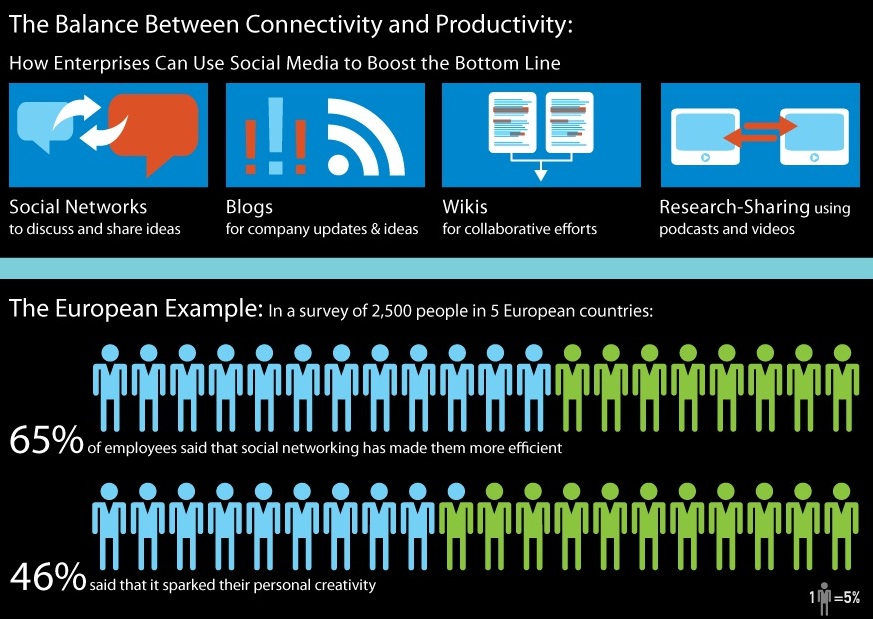
Infographic showing the balance between connectivity and productivity in Europe

Fig 2 – Infographic showing the effect of social networking on employees in Europe

Looking to the future, there is a relatively new technology which could have a significant impact on information specialists: cloud computing. This has been defined as ‘a model for enabling ubiquitous, convenient, on-demand network access to a shared pool of configurable computing resources...’ (Mell & Grance, 2011). Many companies already use a similar model to this, as EDRM Systems retrieve data from a central server. Cloud computing goes further, as the software and data are all stored online and computers are used to access an online environment in which to work. Cloud computing relates back to O’Reilly’s concept of software above the level of a single device, as it provides software as a service (see also Luftman & Zadeh, 2011). The challenge for information professionals is to exploit and add value to this transition to decentralised information systems, as it will require a difference level of support for users. Other implications to consider will be the amount of control information professionals have over systems – for example, if a local EDRMS is replaced by a central cloud where information is stored, how will it be organised? How easy will it be to control access, and to maintain information integrity?


Conclusion

This blog has explored the use of Web 2.0 as a method for publishing digital information. The first conclusion that can be drawn from the examples outlined is that the ability to publish information with the Internet as a platform, as described by O’Reilly in his definition of Web 2.0, has opened up accessibility to information for a wide variety of people. Individuals, groups and companies can easily publish and use digital information. The example of blogging demonstrates how Web 2.0 tools and sites are enabling people to access and share information proficiently.

Second, online information is accessed in a different way; previously information was ‘pushed’ by publishers on read-only web pages. Web 2.0 websites encourage user interaction, indicating that information is used more dynamically, allowing ideas to develop in a creative, collaborative space; O’Reilly’s concept of collective intelligence. This blog has observed the importance of information scientists in this environment, to offer methods of organising and measuring the value of the vast quantity of information published and absorbed online. Specialist skills will continue to be valuable to meet these challenges and exploit potential uses of Web 2.0 technologies.

O’Reilly’s definition of Web 2.0 as software above the level of a single device was discussed. Technological developments have allowed people to remain connected almost limitlessly, using applications on mobile devices to publish and read information online, facilitating efficient information-related tasks, such as streaming Tweets and sharing links. This blog has looked to the future to evaluate the usefulness of Web 2.0 technologies going forward. Arguably, a significant change will occur as use of cloud technologies is adopted by individuals, businesses and public services.

It is difficult to draw a conclusion about the impact Web 2.0 technology will have on the information profession as a whole, but it can be said with some certainty that information will continue to need organising and maintaining however it is presented and accessed by users. Information professionals will not necessarily be managing information in the traditional sense, acquiring, cataloguing and distributing it, but they will move forward as application developers, database managers and advisers on legislation and best practice as users take more control over publishing, organising and using information.


Bibliography

Aharony, N. (2008) “Web 2.0 in U.S. LIS Schools: Are They Missing the Boat?” Ariadne 54 Available at: http://www.ariadne.ac.uk/issue54/aharony/  [Accessed 29/11/11]

Aharony, N. (2011) “Web 2.0 in the professional LIS literature: An exploratory analysis” Journal of Librarianship and Information Science 43(3)

Anderson, P. (2007a) What is Web 2.0? Ideas, Technologies and Implications for Education (JISC: Bristol) Available at: http://www.jisc.ac.uk/media/documents/techwatch/tsw0701b.pdf [Accessed 02/12/2011]

Anderson, P.  (2007b) “`All That Glisters Is Not Gold' -- Web 2.0 And The Librarian” Journal of Librarianship and Information Science 39(4)

Blogger. Accessed at: www.blogger.com [Accessed 17/12/11]

Coker, B. (2011) “Freedom to surf: the positive effects of workplace Internet leisure browsing” New Technology, Work and Employment 26(3) 

Cormode, G. & Krishnamurthy, B (2008) “Key differences between Web 1.0 and Web 2.0,” First Monday 13(6) [Accessed *date*] Available at: http://www.uic.edu/htbin/cgiwrap/bin/ojs/index.php/fm/article/view/2125/1972 [Accessed 29/11/11]

Dugan, L. (2011) ““No Tweeting!” How Restricting Social Media At Work Affects Productivity [INFOGRAPHIC]” MediaBistro.com Available at: http://www.mediabistro.com/alltwitter/restricting-social-networks-at-work_b15379 [Accessed 23/12/11]

Evans, M.P. (2009) “The Aggregator Blog Model: How a Blog leverages Long Tail Economics,” Journal of Information Science and Technology 6(2)

Facebook. Available at: www.facebook.com [Accessed 15/12/11]

Flickr. Available at: www.flickr.com [Accessed 15/12/11]

Fraser, M. & Dutta, S. (2008) Throwing sheep in the boardroom [electronic resource]: how online social networking will transform your life, work and world (Chichester : Wiley)

KamlaBhatt (2007) Tim O'Reilly on What is Web 2.0? Available at: http://www.youtube.com/watch?v=CQibri7gpLM [Accessed 15/12/11]

Laningham, S. (ed.) (2006) Tim Berners-Lee. Podcast, developerWorks Interviews, 22nd August, IBM website. Available online at: http://www.ibm.com/developerworks/podcast/dwi/cm-int082206.txt [Accessed 18/12/11]

Luftman, J. & Zadeh H.S. (2011) “Key information technology and management issues 2010–11: an international study”. Journal of Information Technology, 26(3)

Maness, J. (2006) "Library 2.0 Theory: Web 2.0 and Its Implications for Libraries". Webology, 3(2), Article 25. Available at: http://www.webology.org/2006/v3n2/a25.html  [Accessed 29/11/2011]

Mell, P. & Grance, T. (2011) The NIST Definition of Cloud Computing (Draft): Recommendations of the National Institute of Standards and Technology Available at: http://docs.ismgcorp.com/files/external/Draft-SP-800-145_cloud-definition.pdf [Accessed 18/12/11]

Mitchell, C. (2011) Trust Me, I’m a Follower. Comms2point0 Available at http://www.comms2point0.co.uk/comms2point0/2011/12/7/trust-me-im-a-follower.html [Accessed 12/12/2011]

OReilly, T. (2005) What Is Web 2.0: Design Patterns and Business Models for the Next Generation of Software Available at: http://oreilly.com/pub/a/web2/archive/what-is-web-20.html?page=1 [Accessed 17/12/11]

O'Reilly (2011) Web 2.0 Summit 2011: John Battelle and Tim O'Reilly, "Opening Welcome" Available at: http://www.youtube.com/user/OreillyMedia?feature=relchannel#p/c/E7E5EFF32BE55315/3/KhGTp-wymj4 [Accessed 15/12/11]

StateOfThe Blogosphere (2011) “State of the Blogosphere 2011: Introduction and Methodology” Technorati Available at: http://technorati.com/blogging/article/state-of-the-blogosphere-2011-part2/page-2/ [Accessed 15/12/11]

Twitter. Available at: www.twitter.com [Accessed 30/12/11]

Vickery, G. & Wunsch-Vincent, S. (2007) Participative Web and User-Created Content: Web 2.0, Wikis and Social Networking (Paris: Organisation for Economic Co-operation and Development)

Warr, W. (2008) “Social software: fun and games, or business tools?” Journal of Information Science 34(4)

Xu, G., Zhang, Y. & Li, L. (2010) Web Mining and Social Networking : Techniques and Applications. Web Information Systems Engineering and Internet Technologies Book Series 6 1st Edition. (New York: Springer)

Yammer. Available at: www.yammer.com [Accessed 15/12/11]

Wednesday, 7 December 2011

Information Architecture

In our final DITA lecture we considered web site design; more specifically information architecture. We considered what makes a good web site by considering what end users love and hate about the web. Our lecturers listed the following:
LoveHate
Good DesignCan't Find it
AestheticsGratuitous Bells and Whistles
Big ideasInappropriate Tone
UtilityDesigner-Centredness
FindabilityUnder-Construction
PersonalisationNo attention to detail
Waiting

Much of this is common sense - for example, people will get frustrated if they cannot find what they need, or if they are overwhelmed with unnecessary graphics. I have certainly been irritated in the past by websites that make you watch (or click a button to skip) a video before going to the main site - especially if you intend to use it a lot.
We considered why it is important to organise information. For you info pros out there, the answer is incredibly obvious, but for the sake of argument let's spell it out. Not organising your information might seem quicker when you create it. A common cry where I work is 'why can't we just put things in our personal drives and be done with it?' The reason is twofold: first, when you come to look for something it will be like searching for a needle in a haystack. Second, if it's on your personal drive, we can't help you as much, because we can't see it. (I risk digressing here to the importance of a nice EDRMS in an organisation, so perhaps I will move on.) If this argument doesn't work, one can point to financial reasons - Jakob Nielsen was quoted in Rosenfeld and Morivlle's book 'Information Architecture' saying, 'low intranet usability costs the world economy $100 billion per year in lost employee productivity' (p.xii). This was back in 2002, so nearly a decade later I suspect this figure is a lot larger.

Organising information on web pages is actually very flexible. For example, it is possible (although perhaps not recommended!) to link an unlimited number of pages. In the 'real world' it is more difficult to do this; if you compare information architecture to architecture (buildings), you would not be able to link a room to an infinite number of rooms. A database is slightly different, as entity relationships tend not to link to a very large number of other entities. (This is due to the requirement for unique identifiers; other tables get added in - see the database blog for more details on this!)

Above we looked at a list where web loves and hates were identified. So how do we avoid falling into these traps? A cynical response, perhaps, is to not let the graphics design team get over excited(!) However, our lecturer pointed out that another trap people fall into is handing over the website design to the geeks, who make it over-technical. To avoid this when developing a web site, it is important to have people from lots of backgrounds on the design team, including: graphic design, technical types (for dealing with databases, programming, etc), project managers and information architects. Information architects generally have a background in information management - for librarians it can be a natural move as it is basically creating a structure, providing labels and making things organised.

When you've got your team you need to consider how you are going to achieve the web loves listed above (and avoid the web hates!). There are lots of guides on the web describing how to put together a good web site (for example, Smashing Magazine and Sharpened Productions). A common theme is to be user focused. It seems obvious, but think about who is using your website, why they are using it, and how they might use it. A general rule of thumb is to avoid making people think too much; navigation should be intuitive. This is where good architecture comes in. An information architect considers the relationships between pages, optimises access to information and of course will know all about indexing! In addition, they will be familiar with consistent labelling, for example not mixing up their nouns and verbs.

So what can we conclude? Good web design isn't just about having lots of graphics and helpful information (although this is still important!). With the expansion of the Web people are increasingly impatient and fast-moving, so good navigation systems and searchable web pages are a must. People visiting your web page shouldn't be forced to think too much, which is possible with consistent labelling. (To think about it another way, people shouldn't be scrutinising your labels too closely, they should just be using them).

Sunday, 13 November 2011

Web Services and APIs

Like this on Facebook. Read my Twitter feed. Have a look at the Google map below to see where we are. These are the kind of statements that web users are getting used to in a Web 2.0 environment. Usually, however, not a lot of thought goes into how these buttons and feeds are actually integrated into web pages. However, this is what we discussed this Monday in our DITA lecture.

APIs provide an interface, without any requirement for technical understanding of what goes on in the background, thereby reducing the need for technical understanding. The ideal is that people will be able to create APIs with no programming background whatsoever. Our lecturer described APIs as an underlying pillar of Web 2.0. APIs (generally it is agreed that this stands for Abstract or Application Programming Interface) are programming tools. PC Mag (no date) describes what APIs are and how they work:

A language and message format used by an application program to communicate with the operating system or some other control program such as a database management system (DBMS) or communications protocol. APIs are implemented by writing function calls in the program, which provide the linkage to the required subroutine for execution. 


A web service is a type of API. O'Reilly (2009) states that 'a web service is any piece of software that makes itself available over the Internet and uses a standardized XML messaging system'. A web service, as the name implies, is a service (software) which is available over the Internet. Web services use the same technology as web pages (the client-server relationship), and it even looks a bit like HTML because XML uses tags. However, web services are content only - unlike web pages there is no structure to an XML document. Additionally, where web pages are designed to be read by humans, web services are designed to be read by machines.

While XML means eXtensible Markup Language, it is not actually a language. Instead, it provides conventions for creating your own language with tags; it is sometimes described as a meta language. As it is not strictly a language, there is no international standard; to quote Pirates of the Caribbean, 'the code is more what you'd call "guidelines" than actual rules.'

An example of APIs

Let's say I don't understand the way that Facebook works, but I want to let people 'like' my page. The nice people at Facebook have put the code on the web so that you can do just that. I have done so, on my 'mash up' web page here. It is unnecessary to understand exactly what the code means, because it works. Although, if you are interested the coding you need is:

<div id="fb-root"></div>
<script>(function(d, s, id) {
  var js, fjs = d.getElementsByTagName(s)[0];
  if (d.getElementById(id)) {return;}
  js = d.createElement(s); js.id = id;
  js.src = "//connect.facebook.net/en_GB/all.js#xfbml=1";
  fjs.parentNode.insertBefore(js, fjs);
}(document, 'script', 'facebook-jssdk'));</script>

Then where on your web page you want the code to appear you need to add:

<div class="fb-like" data-href="http://www.student.city.ac.uk/~abkb846/public_html/MashUp.html" data-send="true" data-width="450" data-show-faces="true"></div>

You can put this on any web page, the only bit you need to change is the URL, which I have made bold above. The script above is a bit confusing for humans to read, but easy for machines to understand. It is 'asking' Facebook to run its 'Like' process on the web page, without the owner of the web page needing to understand how Facebook does this in the first place. The Facebook API is the interface which allows applications to communicate with each other (usually without the awareness of the user at all).

Conclusion


To sum up, the use of APIs could potentially open up programming to users, as the need for coding knowledge is reduced. APIs are incredibly useful for social media as they are great for communication. They open up communication between different programs and allow people to improve functionality of web sites. 


O'Reilly Media (2009) Top Ten FAQs for Web Services. Available at http://www.oreillynet.com/lpt/a/webservices/2002/02/12/webservicefaqs.html [Accessed 7 November 2011]
PC Mag (no date) Definition of API. Available at http://www.pcmag.com/encyclopedia_term/0,2542,t=application+programming+interface&i=37856,00.asp#fbid=9qFJ8KQn0H3 [Accessed 7 November 2011]

Sunday, 30 October 2011

The World Wide Web and HTML


My blog, Information Overload!, can be accessed at http://kaysafus.blogspot.com/


In this blog I will discuss the World Wide Web (WWW, or Web) and Hypertext Markup Language (HTML) as a technology for the digital representation of information, in relation to Web 1.0. I will examine the technical details with a short background history, before considering the opportunities and limitations of using the Web and HTML.

The Web is not the same thing as the Internet. The Internet is the channel through which the Web can function. Email also uses the Internet as a channel. The Web was designed to link information stored on computers. Tim Berners-Lee, its inventor, worked at CERN and originally designed it to enable him to remember connections between people, computers and projects. His vision was to have a ‘single, global information space’ (Berners-Lee, 1999, p. 5). Specifically, his solution was to use hypertext to allow users to move between documents. In his proposal, Berners-Lee offered the solution of a ‘universal linked information system’ (Berners-Lee, 1990). He developed HTML as the primary language for web documents, allowing users to instruct browsers how to display content on a webpage using tags (Chowdhury, 2008).

HTML works by using tags to inform the Web browser how information is to be portrayed on the page. A tag is enclosed in triangular brackets, for example <HTML> informs the browser that this is where the HTML begins, and </HTML> informs it that the HTML ends. I have created a website which demonstrates some of the different tags available.

The term Web 1.0 describes the Web in its early stages, when it was primarily designed to display and share information, rather than allowing users to add their own content, for example by contributing to wikis. Early webpages tended to be rather plain, and merely displayed information and provided hyperlinks to relevant documents elsewhere on the Web. Over time, presentational tags were developed to improve the appearance of webpages, which I will discuss later.

The Web and HTML provide a number of opportunities for the representation of information. It was designed to end incompatibility between different computers (Berners-Lee, 1999). Webpages can be viewed on different machines, presenting information consistently, and allowing users to view and navigate between information in the same way. This is still important today with a huge range of devices and programs used to access the Web. The Web and HTML have been applied to share information globally effectively in all manner of fields, including Information Science. Most webpages use navigation with hyperlinks to assist users, such as guidance on using the catalogue and on Information Management policies on the National Archives webpages here.

Using HTML is fairly simple; therefore it is popular (Chowdhury, 2008). Unlike other computer languages, HTML is in plain English and does not require users to have an in-depth knowledge of programming. Unlike more complex technologies for representing information, such as using SQL to create databases, HTML offers users an easy method to display and share digital information.

Another reason that HTML can be very useful for information professionals is that it allows metadata tags (or meta tags) to improve the experience for a user without them even being aware of it. For example, adding keywords to a webpage describes the page’s content. Using meta tags effectively can offer powerful navigation and improve information retrieval (Rosenfeld & Morville, 2002).

However, there are also limitations to the Web and HTML. In Web 1.0, HTML was not a multi-lingual language. Many languages use scripts which cannot be represented in standard HTML, because it is ‘based on a very limited coded character set.’ (Yergeau, no date) So for example, the Omniglot webpage uses images to demonstrate Sanskrit writing, which means that users cannot copy and paste characters, or interact with them as easily as with Latin languages.

Additionally, while HTML was originally compiled of elements for describing the structure of information, such as paragraphs, hyperlinks and headings, it evolved to include presentational tags, including fonts, colours and tables. This has been attributed to the introduction of Mosaic (Meyer, 2000). Presentational tags made HTML coding confusing and untidy, and caused interoperability problems (Chowdhury, 2008). This disadvantage of HTML has been recognised, and the World Wide Web Consortium (W3C) introduced a recommendation called CSS. CSS stands for Cascading Style Sheets, and offers rich styling of web documents (Meyer, 2000). This removes the need for tags like <B> (for making text bold). The use of CSS created another opportunity, as HTML can return to its original purpose, which was as a structural language, and the presentational aspect of webpages can be addressed by using CSS. This is useful for information professionals, as it helps to separate out the design aspect. For example, it adds stronger argument that searching is an information specialist area rather than an IT or web design area, as the emphasis is on the structure and content of pages.

I have concluded that HTML and the Web are appropriate technologies for the digital representation of information, in relation to Web 1.0. With my webpage, I demonstrated how HTML tags and hyperlinks can be applied technically for the management of digital information. Today the Information Profession exploits HTML and the Web extensively. In particular, the Web is used for information sharing, for structuring information and for ease of navigation, as demonstrated on The National Archives webpages. Meta tagging is also incredibly useful to information professionals, notably for powerful searching and retrieval functions. HTML is an effective tool to provide access to information because it permits information to be displayed on a range of devices. Furthermore, HTML is relatively easy to learn as it uses plain English and does not require a thorough knowledge of programming, therefore allowing more people to use it.

I investigated the constraints of HTML and the Web as Web 1.0 technologies. I recognised the issue with displaying non-Latin languages as script. This was a problem for basic Web 1.0 webpages; it seems that these could only be represented on a webpage with images, which reduced options for manipulation of information. I highlighted the limitations of tagging, particularly how HTML coding became cluttered with presentational tags. I concluded that this problem became less significant with the introduction of Cascading Styling Sheets, which allowed programmers to separate structural and presentational code.


Berners-Lee, T. (1990) Information Management: A Proposal [online] Available at http://www.w3.org/History/1989/proposal.html [Accessed 22 October 2011]
Berners-Lee, T. (1999) Weaving the Web: the origins and future of the World Wide Web, London: Orion Business
Chowdhury, G. G. and Chowdhury, S. (2008) Organising Information: From the Shelf to the Web, London: Facet Publishing
Meyer, E.A. (2000) Cascading Style Sheets: The Definitive Guide, Sebastopol: O’Reilly Media Inc.
Omniglot (no date) Sanskrit [online] Available at http://www.omniglot.com/writing/sanskrit.htm [Accessed 22 October 2011]
Rosenfeld, L. and Morville, P. (2002) Information Architecture for the World Wide Web, Second Edition. Sebastopol: O’Reilly Media Inc.
The National Archives (no date) Catalogue [online] Available at http://www.nationalarchives.gov.uk/catalogue/default.asp?j=1 [Accessed 22 October 2011]
Yergeau, F. (no date)  A world-wide World Wide Web. [online] Available at http://www.w3.org/International/francois.yergeau.html [Accessed 22 October 2011]

Thursday, 13 October 2011

Databases and SQL

Monday's lecture was about databases, in particular looking at SQL (pronounced either as the letters, or as 'sequel' depending on how you feel about it). We had an introduction to databases to bring everybody up to speed - I was surprised how much I remembered from GCSE IT. My teacher would have been proud. We discussed when a database is a good idea, and when it's not such a good idea. A rule of thumb seems to be that it's a good plan when it's your data as opposed to someone else's. For that it might be a better idea to think about information retrieval (that's next week's lecture!).

It is a good idea to have a centrally managed and designed database. Problems of the past still haunt our offices today - it's now so easy to make a database a lot of people still use local ones rather than having a nicely linked up central database. This causes all manner of problems due to inaccurate data (not to mention legal issues like Data Protection!). Instead, organisations should have their data stored in one place, with each department accessing only the data that is relevant to them. The Database Management System (DBMS) controls access to the data by various departments / people.

So to be clear, the DBMS is the software which lets the users get at the data, whereas a database, to quote my course handout, is an 'integrated collection of data shareable between users and application systems'. So it's the stuff behind the scenes rather than the shiny interface the users get to see. Using a DBMS is advantageous as it assures information integrity (insofar as it gets updated everywhere when it's updated once). It also removes the reliance on a certain program as it is a collection of data which can be used by more than one application.

So what should it look like? Perhaps the way to explain this best is to say what you don't want. You don't want duplication within a table, and the best way to make sure this doesn't happen is to look at relationships and break up your data into different tables. I'll give you an example. Let's say we have some form of music database, with song titles, album names, artists and release date. So you'd have a table that looks like this:


Song_Title Album_Name Artist Release_Year Genre
Don't Marry Her Blue is the Colour The Beautiful South 1996 Pop
Perfect 10 Quench Beautiful South 1998 Pop
Be Here to Love Me Feels Like Home Norah Jones 2004 Chill Out
Sunrise Feels Like Home Jones, Norah 2004 Chillout
Never Gonna Give You Up Greatest Hits Risk Astley 2002 80s

There's a few things to notice about this table. Firstly, did you notice how I put underscores in the titles? This is because it's generally not a good idea to put space in your titles - lots of programs don't like it. Just because Microsoft Access lets you do it, it doesn't mean it's a good idea! So use underscores, make it all one word, remember the user doesn't see this stuff.

This is probably a good time to mention primary keys. Did you notice that there isn't any one field that you could use to uniquely identify a song? Every table needs one of these, and the good news is most DBMSs can create these for you. Primary keys are important when it comes to making separate tables, which I will come to in a minute!

So back to the music, as it were.  There are lots of duplications, for example the album name, the artist, the release date and the genre! This can be fixed by dividing the data up into the following tables:


Did you also notice the errors? The Beautiful South perform two of these songs but the band name is different in two rows. This is why having duplication in one table can be such a bad idea, and this is why we need more than one table.

Song

Song_ID Song_Title Album_ID
1 Don't Marry Her 1
2 Perfect 10 2
3 Be Here to Love Me 3
4 Sunrise 3
5 Never Gonna Give You Up 4

Album


Album_ID Album_Name Artist_IDRelease_Year
1 Blue is the Colour 1 1996
2 Quench 1 1998
3 Feels Like Home 2 2004
4 Greatest Hits 4 2002
5 Nobody's Prefect 5 2001

Artist

Artist_ID Artist_Name Genre_ID
1 The Beautiful South 1
2 Norah Jones 3
3 Jimmy Eat World2
4 Rick Astley5
5 The Cheapskates 4

Genre

Genre_IDGenre
1Pop
2Rock
3Chill Out
4Ska
580s

This removes the duplication issue. Each table has a primary key, or unique identifier. In some of the tables, a primary key from a different table is in a column to match tables together. For example, in the table 'Artist' there is a column for 'Genre_ID'. When an identifier is in another table, it is known as a foreign key.

Now to look at some SQL and query our database! This is the most important bit. When searching you want to get out helpful data, and that means getting what you want and not getting what you don't want. It sounds obvious, but people often sift through lots of rubbish. Think about searching Google - it's a great tool but if you don't put in a sensible search you can get a lot of irrelevant results. If you don't believe me, try searching 'tablet' - you want to see what you could get instead of an iPad, but you end up with lots of things you didn't want, don't you?

Anyway, before I get sidetracked and start thinking about iPads, let's get back to SQL. To search, the basic syntax you need looks like this:

SELECT fields
FROM tables;

So if we were searching the database above for an album and its release date, we'd need:

SELECT Album_Name, Release_Year
FROM Album;

Which would give you:


Album_NameRelease_Year
Blue is the Colour1996
Quench1998
Feels Like Home2004
Greatest Hits2002
Nobody's Prefect2001

When using select, there is no limit to the number of fields you can put in there. However, if you want everything then you can use an asterisk:

SELECT *
FROM Artist;

Which would give you:


Artist_IDArtist_NameGenre_ID
1The Beautiful South1
2Norah Jones3
3Jimmy Eat World2
4Rick Astley5
5The Cheapskates4


This is good if you want to see everything, but realistically an end user doesn't want to see the foreign keys in this table, they want the data, and this is where you need to start making your queries a bit more interesting. It isn't as obvious as it first looks, which can cause people some problems. If you wanted the genre of all the albums, you might this of tying in:

SELECT Artist_Name, Genre,
FROM Artist, Genre;

It seems logical, but this would actually give you a table with everything in it - every artist next to every genre. This is because computers aren't smart enough to know that you actually want the relevant Genre. It just pulls everything out of the database and dumps it in front of you. Instead, you need to tell it what you want by typing in this:


SELECT Artist_Name, Genre,
FROM Artist, Genre
WHERE Artist.Genre_ID = Genre.Genre_ID;

This will bring back a list where the Genre ID matches on both tables, and you get your answer. There's some new syntax in this code. There is a comparison operator '=' in the WHERE clause. There are a few of these, including (but not limited to)

= equal to
< less than
> greater than
<= less than or equal to
>= greater than or equal to
!= not equal to

The important thing to know about using the WHERE clause is that numbers do not require quotation marks, but any other characters do. So if you are looking for a date you would only type in:

WHERE Release_Year = 1998

If you are looking for text then you need quotation marks:

WHERE Song_Title = 'Sunrise'

Another thing to be aware of when using the WHERE clause is a wildcard search. This means you can truncate a word, so if you know that 'Nobody's Prefect' is in there somewhere, but you aren't sure if the database uses the apostrophe or not, you could search for this:

WHERE Album_Name = 'Nobody%'

This brings you everything which has Nobody at the beginning. You can use the % at the beginning and end if you like, so for song titles with the letter P in them you could search for '%p%' (although I'm not sure why you would need to!).

Finally, you can use WHERE more than once, for example you want songs from a certain artist from a certain year. You want to know if there is anything in the database by The Beautiful South after 1997. The syntax would be:

SELECT Artist_Name, Album_Name, Release_Year
FROM Album, Artist
WHERE Artist.Artist_ID = Album.Artist_ID
AND Artist_Name = 'The Beautiful South'
AND Release_Year >= 1997;

Did you notice how some of the fields say the table they are in and some don't? This is when the same field is in more than one table (remember foreign keys?) You need to define where you want the data from otherwise you will confuse the computer and it will probably tell you it can't do it.

So to conclude querying two tables, the syntax generally looks something like:

SELECT (whatever fields you want)
FROM tableA, tableB
WHERE tableA.primarykey = tableB.foreignkey;

If you forget to do this then you will probably get a lot more results than you had counted on, so be careful!

A final note on results; if you get results where the same thing appears on more than one row (this is possible even with neat data tables) then you can make sure it only appears once. For example, if you wanted to know which albums were released before 2000, you would get The Beautiful South twice, as both their albums were release before 2000. To prevent this from happening, you can add in 'distinct', which means it will only list it once, whether the results bring them back twice, or two thousand times! So the syntax would be:

SELECT DISTINCT Artist_Name
FROM Album, Artist
WHERE Artist.Artist_ID = Album.Artist_ID
AND Release_Year < 2000;

Apologies for the length of this post - it's all those tables! I have tried to present this clearly, but the best way to understand using SQL is to have a go. When doing this in the lab myself I got very cross about adding in commas - they only go in between items not at the end (so above you would not put FROM Album, Artist, because there is a comma at the end and the computer doesn't like it).

Monday, 10 October 2011

Cascading Style Sheets

Cascading style sheets, or CSS, can format document content using markup languages, such as html script (see my previous post for a brief introduction to html). The idea of CSS is to separate the document content and document format. This is advantageous as it means that the coding for the design doesn’t have to be mixed up with the content of a web page. It is also useful as you can standardise a selection of web pages by using the same style sheet, or even apply your own formatting to existing web pages. This would be useful should you consistently need text to be larger, for example.

The W3 web page has a helpful introduction to CSS here. It explains the three different ways of adding style information to documents:
  • Linking Style Sheet
  • Internal Style Sheet
  • Inline Style Sheet1
The differences between these three ways of applying style sheets is where the coding is ‘kept’. Internal and Inline style sheets are both within the same page – Internal is within the head of the document using the tag <style>; Inline is directly within the html document. Linking Style Sheets are completely separate documents, which would make them the best candidates for standardising web pages (as mentioned above). This means you can edit the formatting across a number of documents, so if you were in a corporate environment and your logo changed you could apply it universally rather than page by page. This has been described as 'brand cohesiveness' (Nielsen, 1997)2.

W3 has some guidelines on using CSS, including a list of terminology. The recommendations define that CSS1 is 'human readable and writable, and expresses style in common desktop publishing terminology'3. For example, if you wanted to apply a certain colour to a title or paragraph, you would use the property 'color' (note the American spelling!). This is easy for a human to understand. The value would be written in hexadecimal (perhaps less easy for a human to understand) which looks something like this: #b22222 (this is 'frebrick' red). For a full list of colours on the w3 website, click here.

To explain what I mean by 'property' and 'value' I have borrowed a helpful diagram from the W3 wiki:

CSS Syntax

The selector is the thing you are styling, for example p would be a paragraph.
The property name/property is the format item, so 'color' would be colour, 'font-size' would be font size, etc.
The value is what you are assigning to the property. For font size it is recommended that you use a percentage. This means that it will take the font size that a user normally uses, and make it larger/smaller, for example font-size:80%

So an example would be that you would like the body of the text to be in italic. That would look like this:

BODY {font-style: italic}

The best way really to demonstrate all of this would be with an actual style sheet. I have managed to get a web site working on the City server. I have applied a style sheet which I adapted from a guide sheet we were provided with in the lab session. My website is here. The CSS for the page is here. The bit of code that tells my web page to use the CSS is in the <head> and it looks like this:

<LINK REL="stylesheet" HREF="http://www.student.city.ac.uk/~abkb846/public_html/kaystyle.css" TYPE="text/css">

Using CSS certainly seems useful, as you can apply formatting rules quit easily without getting mixed up in the main information. Blogspot, for examples, does not seem to do it this way - if you change a font it makes the html really messy (if you don't believe me have a look at the source code. All I did was change the font!) It's certainly something I will be trying to learn more about and have a go at!

1What is CSS? CSS Training, W3 Wiki [online] accessed 9 October 2011
2Nielsen, J. Effective Use of Style Sheets, Use It [online] accessed 9 October 2011
3Cascading Style Sheets, level 1, W3C Recommendation 17 Dec 1996, revised 11 Apr 2008 [online] accessed 9 October 2011

Tuesday, 4 October 2011

DITA week 2: The Internet, html and the WWW

Hello bloggees! I have no idea if that is an actual term, but I have decided to use it anyway. If you have a better suggestion as to how I should address you, please comment below as I am still learning netiquette. As we all are, as it is ever developing. Maybe they should start a finishing school for the net...


I digress. So, to get back on topic: today's DITA lecture was about the Internet and the World Wide Web, with a focus on html in the lab. Please note, that while many people use 'the Internet' and 'the World Wide Web' as interchangeable terms, I will not be doing so. I will explain why below. I will then go on to explain what we did in the lab, including some examples, which I hope will be suitably snazzy.


Anyone who has studied a whirlwind history of information or computer science will know the origins on the Internet, and of the World Wide Web. However, I feel it would be beneficial to assume that my readers are new to the topic. So if you don't want to read about the history  and background then you can skip ahead to the html bit here.


The Internet dates back to the 1960s, where it was developed as a way of sharing information via a network of networks. According to ISOC, in August 1962 J.C.R. Licklider 'envisioned a globally interconnected set of computers through which everyone could quickly access data', his "Galactic Network" concept.1 He worked at DARPA (Defense Advanced Research Projects Agency) at the time, so the Internet actually had military origins. He was inspired by 'Project Lincoln', an early warning network to guard against Soviet nuclear bomb attack in the 1950s. The project eventually resulted in SAGE, Semi-Automatic Ground Environment, which included 'the world’s first long-distance network, which allowed the computers to transfer data'.2 I won't go into huge detail here because I appreciate that this blog will get very long (I could probably dedicate an entire blog to the history of the Internet!), but if you are interested the DARPA site is interesting and I have put a link in my references at the bottom of the blog. So, to cut a long story short, a networking project was launched, the concept of sending packets was dreamed up, an architectural description of a network of networks was put together in the 1970s by Kahn and Cerf, people started picking up on it, and it was deemed a beautiful thing.


The World Wide Web, by contrast, has 'only' been around since the 1990s (although Tim Berners-Lee started working on the idea in the 1980s). In his book, Weaving the Web, Berners-Lee describes his vision of the Web as 'a universal, all-encompassing space'.3 It was originally designed as a directory and method for information sharing at CERN. It was soon picked up by academics, and then spread until it was in common usage, as it is today.


To make it really clear I will borrow an analogy our lecturer shared with us. The Internet is the road, and the World Wide Web is like a car 'travelling' on it. There are other 'vehicles', the most common example being email.


1Leiner, B.M., Cerf, V.G., Clark, D.D., Kahn, R.E., Kleinrock, L., Lynch, D.C., Postel, J., Roberts, L.G., Wolff, S. A Brief History of the Internet. [online] Accessed 4 October 2011

2Waldrop, M. DARPA and the Internet Revolution. [online] Accessed 4 October 2011

3Berners-Lee, T. (1999) Weaving the Web : the origins and future of the World Wide Web. London: Orion Business, p. 5

Monday, 26 September 2011

And so it begins...

Welcome to my very first blog post! It's an exciting time.

Why am I blogging now? I'm back at university studying for an MSc in Information Science, and part of the coursework involves blogging. So it seemed wise to get a bit of practice in. Who knows, maybe I will keep it up!

Our lecturer recommended we get in the habit of blogging what we learned this week. So, what have I learned in my first lecture? 

An Introduction to Computers and Digital Information

The aim of the first lecture was to 'introduce the nature and potential of computer and digital information represented at a number of levels and to provide practical experience of using and managing digital data represented in a number of forms and formats.'

To begin with, we discussed the impact of information. After all, we live in an 'information society', and terms are thrown around in popular culture and the news. So it's important to try and figure out what everybody is talking about. Especially when we consider how much information is 'out there', just on the web. Up to 5 exabytes (that's 1 million, million, million bytes if you're curious) were generated in a year in 2003 (Lyman et al, 2003). And in digital terms, 2003 was a long time ago, so this is only increasing. As an information scientist (in the making) it is vital to understand the technology which helps us to organise, manipulate and use data.

Studying at City University, I will be learning about the 'information' part of IT. So I'll be looking at computers and software as tools. Furthermore, I will be looking at architectures not just individual machines and programs. The analogy we were given is comparing a bricklayer to an architect - the information scientist (the 'architect') needs a wider understanding of the impact of IT on information (whereas computer scientists are the 'bricklayers' building the programs).

Looking at bits, bytes and so on was a nice recap from Computer Science A level (which feels like a long time ago, but apparently the knowledge is all still in there somewhere). In our lecture we looked at bits (binary digits) and formats (the agreed structures like ANSI/ASCII). Fortunately I won't have to add up in binary like I did at A level!

As well as formats we considered files - named collections of related digital information. Every file name has meaning attached to it, 'telling' the computer which program to use to read the file. A file-centred approach considers files as single entities with extensions to show the format. Alternatively, a document-centred approach is when documents are built from files, for example a blog post made up from text, video, images, etc. More on this next week!

All in all an enjoyable lecture! And hopefully an enjoyable first blog. Perhaps I will have to put my serious face on in future as I will be throwing in references to related reading. But for now, here is a picture of the sunshine I drew in paint.