Introduction
This blog will outline the background of Web 2.0, discuss its use as a publishing tool using the Internet as a platform and explore its potential in relation to developing technologies. While Web 2.0 is closely related to the semantic web and the growing openness of the Internet (sometimes referred to as ‘Web 3.0’), this is outside the scope of this blog and will not be covered.
The term ‘Web 2.0’ was first used by O’Reilly Media, Inc. in 2004. There has been confusion regarding a definition, as the use of ‘2.0’ sounds like a software upgrade. In fact, Web 2.0 was a term originally used to distinguish Internet companies that had survived the dotcom bubble bursting in 2001. O’Reilly (2005) used 6 headings to define Web 2.0:
1. The Web as Platform
2. Harnessing Collective Intelligence
3. Data is the Next Intel Inside
4. End of the Software Release Cycle
5. Lightweight Programming Models
6. Software above the Level of a Single Device
Since then, O’Reilly has emphasised that ‘the network is the platform’, and that ‘the cardinal rule is... users add value’ (KamlaBhatt, 2007). In others words, collaboration is central to the concept of Web 2.0. It is important to distinguish between Web 2.0 and social networking websites; Web 2.0 is both the platform on which technologies and sites have been built, as well as a space for user-generated content (UGC), rather than the social networking sites like Facebook and Twitter, which are built upon the platform (Cormode & Krishnamurthy, 2008).
This blog will explore three themes, with an emphasis on social networking websites. First, it will discuss the Internet as a platform, including publishing information. Second, it will consider digital data representation, and current use and future potential for information scientists in central government. Finally, it will investigate the latest Web 2.0 technologies and concepts, reflecting on their impact in the digital environment.
Publishing Information
As indicated above, the Internet (or network, or Web) is the platform. This means there is no longer a requirement to have specific software or a particular machine to access the same content. This is why, for example, both Mac and Windows users can utilise Facebook, Twitter, Flickr, and other Web 2.0 sites. This has opened up accessibility to a much wider user-base, as it is no longer necessary to program in HTML to publish to the Web because these sites provide an interface. The OECD suggests that this has democratised publishing on the Internet with a rise of ‘amateurs’ (Vickery & Wunsch-Vincent, 2007). In addition, Xu et al (2010, p.9) indicate that ‘the Web is becoming a useful platform and an influential source of data for individuals to share their information and express their opinions’. This sharing of opinions has changed the dynamic of publishing information, from the one-to-many ‘push’ of Web 1.0 to a many-to-many collaborative environment in Web 2.0.
The user-base of Web 2.0 sites is wider still due to technological advances in recent years. People can now use mobile phones, as well as tablets and laptops to access the Internet. As O’Reilly (2005) states in his definition of Web 2.0, this represents software above the level of a single device. It is possible to access information anywhere with an Internet connection. Additionally, it is easier to publish information on the go, as well as consume it. Most Internet-capable phones and tablets have cameras and facilitate the capture and sharing of information by users with Web 2.0 publishing tools. A common example of this is people sharing holiday photos instantly on Facebook and Twitter.
Blogging websites are publishing tools, and have become increasingly popular. Blogs, such as Blogger, enable users to post online using a familiar interface. While there is the option to write in HTML, many people simply use the text box and formatting buttons (see Fig 1). Several central government departments use blogs on their intranet sites. The Department for Business, Innovation and Skills uses the blogging tool in SharePoint, with senior staff and teams providing updates on their work via a blog. This is an effective way of publishing information, as all staff members have access and can use tools on the intranet to comment and provide feedback. An additional benefit is that no further training is required to use the software, as the interface is familiar to staff. As it is hosted on the intranet, it is accessible to all users as it is possible to apply personalised settings to profiles on their PCs, and to Internet Explorer, which is the browser used to access the SharePoint intranet site.

Fig 1 – the blogging interface on Blogger
A further advantage to blogging is the wide availability of tools, and the ability to create professional-looking web pages with ease (Evans, 2009). Blogs are used by businesses and professionals, looking to publish information. These bloggers also use other Web 2.0 sites, such as Twitter, to capture a wider audience for their blog and to promote their business. A recent survey demonstrated that ‘almost all Professional Full Timers (93%) and Professional Part Timers (91%) us[e] Twitter’ (StateOfThe Blogosphere, 2011). Using multiple Web 2.0 sites allows professionals to push their information efficiently and easily.
Representation of Digital Data
Formerly, users who wished to publish content on the Internet needed an understanding of programming, such as using HTML to publish a web page. With Web 2.0 technologies, this is no longer a requirement as websites provide an interface. An example of this is the use of Yammer, a social networking tool, by a central government department to encourage its staff to work collaboratively. Maness (2006) argues that Web 2.0 ‘is not a web of textual publication, but a web of multi-sensory communication.’ This is the way in which Yammer is used by civil servants; they can publish their ideas, and can also give and receive feedback interactively. It also enables them to promote other people’s ideas by sharing links to other pages, such as news articles and publications. The web is no longer being used purely as a ‘push’ medium, but has been ‘transformed into a dynamic network harnessing creativity and collective intelligence’ (Fraser & Dutta, 2008, p. 2).
This provides a good opportunity for information scientists in government. The use of blogs and wikis allows them to organise their information in an accessible way, giving users the option to add their own folksonomies to optimise information retrieval. O’Reilly (2011) describes this exploitation of web applications as harnessing ‘collective intelligence’, which was one of his definitions of Web 2.0 in 2005. Information scientists could potentially use applications to try to capture information and understand ways of working within their organisations. Using Web 2.0 technologies offers information professionals a great advantage, as they can build applications to cater to their users’ needs. The advantage of this is that, unlike some information systems used, applications tend to be intuitive thus reducing the requirement for training for users. The use of applications also allows information professionals to address ‘one size fits all’ software, such as forcing an Electronic Documents Records Management (EDRM) system on users. It is possible to hide the EDRM system behind a Web 2.0 interface, which can be more easily adjusted to users’ needs. For example, some government departments are looking at implementing a more user friendly SharePoint interface to document management systems, while maintaining the underlying EDRM system to allow information specialists to apply information management policies, such as access controls and retention and disposal rules, behind the scenes.
Central government departments are not the only public service using Web 2.0 technologies to share information. Mitchell (2011) describes how the Deputy Chief Constable from Tayside Police encourages his staff to ‘tweet on the beat’. This creates both a challenge and opportunity for information scientists; the challenge will be to stay on top of the amount of information being published by users, and to try to keep information organised and presented in a meaningful way. These websites do offer some methods of organising information, such as Twitter lists which allows you to create a stream from the users in that group. The advantage of this is an accessible representation of digital information, which offers real-time information for Twitter users, externally and within the organisation. The disadvantage of relying on Twitter would be a loss of control, as information specialists would not easily be able to apply retention schedules, or ensure digital continuity without capturing Tweets and storing them on an internal system. This raises some integrity issues; for instance, context may be lost if police staff include links to external sites which are not captured. Furthermore, the use of Twitter raises the question of ownership and security; the Twitter terms and conditions make it clear that while information posted is your responsibility, they are granted a royalty- free licence to ‘use, copy, reproduce, process, adapt, modify, publish, transmit, display and distribute’ it (Twitter, Terms of Service). In this environment it is important that information specialists provide clear guidelines for staff using Web 2.0 services, to address these risks, although this is no guarantee that they will be adhered to.
Recent Advances
Technological developments have allowed these Web 2.0 applications to flourish. When Tim Berners-Lee first imagined the World Wide Web, he claims that he envisaged the interactive environment that is now associated with the term Web 2.0 (Laningham, 2006). The evolution of information and communications technology (ICT) has made it possible for people to use wikis, blogs, social networking, and the other applications described as Web 2.0. A noteworthy difference is that the use of these technologies has changed the way that people work. Fraser & Dutta (2008) suggest that while organisations are vertical hierarchies, networks are horizontal by nature. This leads to the conclusion that using Web 2.0 applications will enable people to cross these hierarchical divides and work together without barriers. To refer back to the example of government using Yammer, members of staff have noticed that people are no longer working in silos, and are consulting colleagues at all grades across the department, as the use of social networking tools has allowed them to locate people with expertise efficiently. The use of an online digital environment has empowered staff to work flexibly and capably.
Furthermore, a recent study by the University of Melbourne suggests that browsing online, increases productivity within an organisation. Coker (2011) established that those who participated in workplace Internet leisure browsing (WILB) had significantly higher productivity than those who did not. A Socialcast infographic also demonstrates the balance between connectivity and productivity in Europe (see Fig 2) with the use of social networking websites (Dugan, 2011).
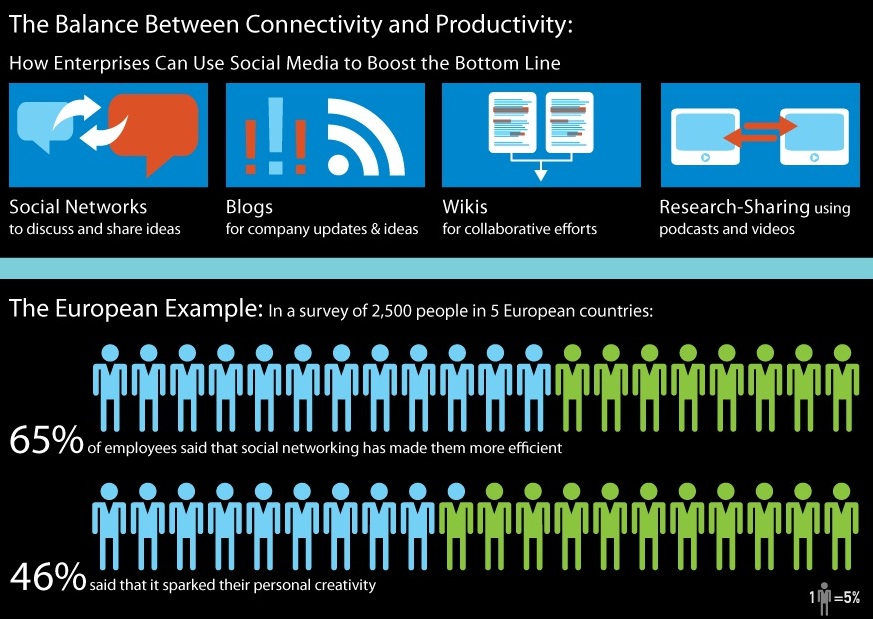
Fig 2 – Infographic showing the effect of social networking on employees in Europe
Looking to the future, there is a relatively new technology which could have a significant impact on information specialists: cloud computing. This has been defined as ‘a model for enabling ubiquitous, convenient, on-demand network access to a shared pool of configurable computing resources...’ (Mell & Grance, 2011). Many companies already use a similar model to this, as EDRM Systems retrieve data from a central server. Cloud computing goes further, as the software and data are all stored online and computers are used to access an online environment in which to work. Cloud computing relates back to O’Reilly’s concept of software above the level of a single device, as it provides software as a service (see also Luftman & Zadeh, 2011). The challenge for information professionals is to exploit and add value to this transition to decentralised information systems, as it will require a difference level of support for users. Other implications to consider will be the amount of control information professionals have over systems – for example, if a local EDRMS is replaced by a central cloud where information is stored, how will it be organised? How easy will it be to control access, and to maintain information integrity?
Conclusion
This blog has explored the use of Web 2.0 as a method for publishing digital information. The first conclusion that can be drawn from the examples outlined is that the ability to publish information with the Internet as a platform, as described by O’Reilly in his definition of Web 2.0, has opened up accessibility to information for a wide variety of people. Individuals, groups and companies can easily publish and use digital information. The example of blogging demonstrates how Web 2.0 tools and sites are enabling people to access and share information proficiently.
Second, online information is accessed in a different way; previously information was ‘pushed’ by publishers on read-only web pages. Web 2.0 websites encourage user interaction, indicating that information is used more dynamically, allowing ideas to develop in a creative, collaborative space; O’Reilly’s concept of collective intelligence. This blog has observed the importance of information scientists in this environment, to offer methods of organising and measuring the value of the vast quantity of information published and absorbed online. Specialist skills will continue to be valuable to meet these challenges and exploit potential uses of Web 2.0 technologies.
O’Reilly’s definition of Web 2.0 as software above the level of a single device was discussed. Technological developments have allowed people to remain connected almost limitlessly, using applications on mobile devices to publish and read information online, facilitating efficient information-related tasks, such as streaming Tweets and sharing links. This blog has looked to the future to evaluate the usefulness of Web 2.0 technologies going forward. Arguably, a significant change will occur as use of cloud technologies is adopted by individuals, businesses and public services.
It is difficult to draw a conclusion about the impact Web 2.0 technology will have on the information profession as a whole, but it can be said with some certainty that information will continue to need organising and maintaining however it is presented and accessed by users. Information professionals will not necessarily be managing information in the traditional sense, acquiring, cataloguing and distributing it, but they will move forward as application developers, database managers and advisers on legislation and best practice as users take more control over publishing, organising and using information.
Bibliography
Aharony, N. (2008) “Web 2.0 in U.S.
Aharony, N. (2011) “Web 2.0 in the professional LIS literature: An exploratory analysis” Journal of Librarianship and Information Science 43(3)
Anderson, P. (2007a) What is Web 2.0? Ideas, Technologies and Implications for Education (JISC: Bristol) Available at: http://www.jisc.ac.uk/media/documents/techwatch/tsw0701b.pdf [Accessed 02/12/2011]
Anderson, P. (2007b) “`All That Glisters Is Not Gold' -- Web 2.0 And The Librarian” Journal of Librarianship and Information Science 39(4)
Blogger. Accessed at: www.blogger.com [Accessed 17/12/11]
Coker, B. (2011) “Freedom to surf: the positive effects of workplace Internet leisure browsing” New Technology, Work and Employment 26(3)
Cormode, G. & Krishnamurthy, B (2008) “Key differences between Web 1.0 and Web 2.0,” First Monday 13(6) [Accessed *date*] Available at: http://www.uic.edu/htbin/cgiwrap/bin/ojs/index.php/fm/article/view/2125/1972 [Accessed 29/11/11]
Dugan, L. (2011) ““No Tweeting!” How Restricting Social Media At Work Affects Productivity [INFOGRAPHIC]” MediaBistro.com Available at: http://www.mediabistro.com/alltwitter/restricting-social-networks-at-work_b15379 [Accessed 23/12/11]
Evans, M.P. (2009) “The Aggregator Blog Model: How a Blog leverages Long Tail Economics,” Journal of Information Science and Technology 6(2)
Facebook. Available at: www.facebook.com [Accessed 15/12/11]
Flickr. Available at: www.flickr.com [Accessed 15/12/11]
Fraser, M. & Dutta, S. (2008) Throwing sheep in the boardroom [electronic resource]: how online social networking will transform your life, work and world (Chichester : Wiley)
KamlaBhatt (2007) Tim O'Reilly on What is Web 2.0? Available at: http://www.youtube.com/watch?v=CQibri7gpLM [Accessed 15/12/11]
Laningham, S. (ed.) (2006) Tim Berners-Lee. Podcast, developerWorks Interviews, 22nd August, IBM website. Available online at: http://www.ibm.com/developerworks/podcast/dwi/cm-int082206.txt [Accessed 18/12/11]
Luftman, J. & Zadeh H.S. (2011) “Key information technology and management issues 2010–11: an international study”. Journal of Information Technology, 26(3)
Maness, J. (2006) "Library 2.0 Theory: Web 2.0 and Its Implications for Libraries". Webology, 3(2), Article 25. Available at: http://www.webology.org/2006/v3n2/a25.html [Accessed 29/11/2011]
Mell, P. & Grance, T. (2011) The NIST Definition of Cloud Computing (Draft): Recommendations of the National Institute of Standards
Mitchell, C. (2011) Trust Me, I’m a Follower. Comms2point0 Available at http://www.comms2point0.co.uk/comms2point0/2011/12/7/trust-me-im-a-follower.html [Accessed 12/12/2011]
OReilly, T. (2005) What Is Web 2.0: Design Patterns and Business Models for the Next Generation of Software Available at: http://oreilly.com/pub/a/web2/archive/what-is-web-20.html?page=1 [Accessed 17/12/11]
O'Reilly (2011) Web 2.0 Summit 2011: John Battelle and Tim O'Reilly, "Opening Welcome" Available at: http://www.youtube.com/user/OreillyMedia?feature=relchannel#p/c/E7E5EFF32BE55315/3/KhGTp-wymj4 [Accessed 15/12/11]
StateOfThe Blogosphere (2011) “State of the Blogosphere 2011: Introduction and Methodology” Technorati Available at: http://technorati.com/blogging/article/state-of-the-blogosphere-2011-part2/page-2/ [Accessed 15/12/11]
Twitter. Available at: www.twitter.com [Accessed 30/12/11]
Vickery, G. & Wunsch-Vincent, S. (2007) Participative Web and User-Created Content: Web 2.0, Wikis and Social Networking (Paris
Warr, W. (2008) “Social software: fun and games, or business tools?” Journal of Information Science 34(4)
Xu, G., Zhang, Y. & Li, L. (2010) Web Mining and Social Networking : Techniques and Applications. Web Information Systems Engineering and Internet Technologies Book Series 6 1st Edition. (New York: Springer)
Yammer. Available at: www.yammer.com [Accessed 15/12/11]
This blog post is available online at: http://kaysafus.blogspot.com/2012/01/web-20-as-collaborative-tool.html
